Showing posts with label OSX Lion. Show all posts

Thursday, February 16, 2012

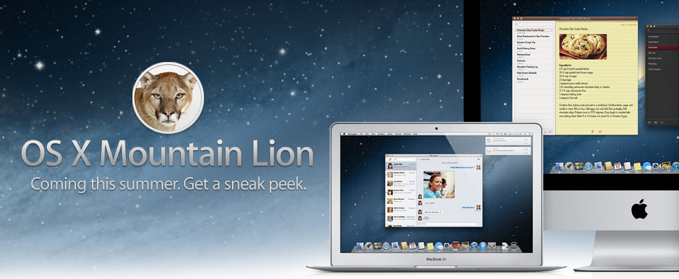
OSX Mountain Lion - Coming Summer 2012

OSXMountainLion-2012-02-16-13-15.png


Lion is no longer king of the OS jungle. Believe it or not Apple has just announced another OSX update - Mountain Lion “coming this summer”. I feel like a broken record on the OSX previews. Once again the “upgrades” are centered around iPhone and iPad users. Lion adopted gestures, apps, and many other things from iOS, and Mountain Lion is doing the same thing.


It seems like most of new features mentioned have to do with actually connecting to iPhone and iPad users. With Mountain Lion, Mac computer users can connect with iOS users and send messages, reminders, notifications, etc. Also, Mac computers can now hook up with iOS gamers via the Game Center. As a non-iPhone user, I guess I can finally stop playing “Words Without Friends” and get in on the real thing. hahah. OSX Mountain Lion will feature AirPlay Mirroring like the iPad and iPhone, so you can zap that YouTube video or PowerPoint presentation from your computer to your TV.


Having just started working with OSX Lion this week, this news is really not that exciting for me. Maybe its because I’m bitter. Just yesterday I sent Apple a feedback email about skrewing up my Exposé/Hot Corner workflow I had used for years. (actually dating back to OS9 with the Window Monkey plugin) Anyways, we shall see what happens. With a new iPad coming out next month, this will only add to the 2012 Apple hype.


If you would like some more info, here is a link to the Apple Mountain Lion page:


http://www.apple.com/macosx/mountain-lion/


for those that are attention deficit, illiterate, or just plain lazy here is a Video preview:


http://www.apple.com/macosx/mountain-lion/features.html#video-mountainlion


Update:
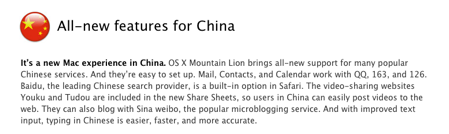
Just saw this on the Mountain Lion Features page. hahah! Title should read, “China: our new target demo”

OSX_China-2012-02-16-13-15.png

Thursday, July 21, 2011

OSX Lion uncaged!

OSX_Lion_LEDdisplay-2011-07-21-08-59.jpg

OK, so it looks like i was not able to preview all of the new updates for Lion before it came out. This could be because I procrastinated, the advertised “new features” were becoming less and less exciting to me, or a mixture of the two. haha! That being said, the time of observing the Lion while it is caged is over. The Lion has finally been set free for all (most) Mac users to use. If you are unsure about whether to upgrade or not, here is a checklist of things to consider:

1. ”Lion runs on all Macs with a 64-bit Intel processor — this eliminates the very first MacBook and MacBook Pro machines Apple sold, the very first Intel based iMac, and the first- and second-generation Intel-based Mac minis.”**** - (This was news to me)

2. You must have OSX 7 Snow Leopard to install OSX Lion
      • also, if you have done a recent software update you probably already have the “App Store” on your system.  It will be necessary to have this in order to purchase the OSX download 
    3. OSX Lion is about a 4GB download from the App Store, so make sure you have a good internet connection or you start the download just before you go on vacation!
        4. OSX Lion is a $29.99 purchase from the App Store
            • - NOTE!!! - This means you can use your iTunes gift cards to purchase OSX Lion! So you can finally cash in all of those unused Apple gift cards you got for Christmas. Also, for the deal nerds like myself, you can save a few dollars on the purchase price. How? Just google “iTunes gift card sale” and you can probably find a local drugstore, supermarket, or electronics store that is offering a deal on the cards. These places offer the gift cards at a discount just to get you in the door. I usually check www.dealmac.com for a Mac deals. If you can’t seem to find anything, there is always eBay. This will probably only save you a few dollars, but hey, you can make fun of your friends for paying FULL Price! Boooooooo!

          If you want some more info, i would suggest reading the link below for a Lion Review by Edward Baig of USA Today. It is rather lengthy, but who am I to bash someone for rambling in an article. After all the news I’ve read, I think best new feature would have to be the “auto-save” that Lion performs in the backround. According to Baig’s article, not all Applications support this feature right now, but it is probably in the near future. While this feature seems very very helpful, I still think I will wait to purchase the update. Personally, I usually wait a few weeks when these updates come out so they can work out all the kinks. This will be less of an issue now than those what had to jump from Tiger to Leopard, but kinks still do exist. In fact, Baig mentioned having some issues with his Wi-Fi with OSX Lion.

          **** http://www.usatoday.com/tech/columnist/edwardbaig/2011-07-20-apple-lion-reviewed_n.htm - “Apple launches Lion, and it roars” - by Edward Baig of USA Today

          Everything considered, it’s just another phase of Apple staying ahead of the game. What will you do? Will you make the leap to Lion?

          Friday, July 1, 2011

          3) Multi Touch Gestures

          MultiTouchGestures1-2011-07-1-15-12.png

          Gestures are nothing new to Apple fans, but this is the first OSX update that is promoting use on the computer. Rubber-band scrolling, page and image zoom, and full-screen swiping are all routine for those who have an iPhone or iPad. Some of the gestures have been available to those who purchased the Magic Mouse or the Magic Trackpad for use with their Mac. But with the OSX Lion update, laptop trackpads will now be gesture happy like the other Apple devices.


          MultiTouchGestures-2011-07-1-15-12.png

          If you are not familiar with the different gestures, Apple now has a pictorial on their website (http://www.apple.com/macosx/whats-new/gestures.html) as well as a quick 2 minute video tutorial to show you the gestures in action on a laptop (see top right of gestures page).

          Once again, this is Apple being intuitive and making something that we would never have asked for. We would have carried on for the rest of our lives using the mouse to click and scroll! Again, I must say that Apple is promoting this feature and OSX Lion like it’s some kind of life changing update. Most of these updates, we would expect to be on the next OSX release. Well, even though I jest at the advertising, I will still enjoy the simple time saving gestures just like everyone else.

          Monday, June 6, 2011

          Apple OSX Lion released in July

          OSXLion6.2011Pic-2011-06-6-21-49.png

          Steve Jobs announced today at its Worldwide Developer Conference, that OSX Lion will be released in July. (This is actually earlier than i was expecting, i guess i will have to hotfoot my New Feature reviews haha!) The new Macintosh computer upgrade will cost $29.99. Also, if you check out Apple’s new OSX Lion page, (http://www.apple.com/macosx/whats-new/#video-lion) they have just added some more info and pictures about the new OSX features. There is even another one of those cool Apple videos where you can get a visual of some of Lion’s features in action. There is a tutorial video of how Multi-Touch Gestures will be used as well.

          If you click the link below, you can read a USA today article that sums up the events at the Worldwide Developer Conference today. The major news was mainly concerning the new iCloud services; however, there is also some mention of OSX Lion and the new iOS. A lot of new information on all three of these subjects is easily available on the updated Apple homepage (www.apple.com)

          http://www.usatoday.com/tech/news/2011-06-06-apple-icloud_n.htm

          It looks like the battle between all the big electronics and technology players is really beginning to heat up. It will be interesting to see what goes on this summer; Apple just showed a few of their cards today.

          Wednesday, May 25, 2011

          2) Launchpad

          Screenshot2011-04-01at6.05.31PM-2011-05-25-00-49.png


          Next on the list of new things for OSX Lion is LAUNCHPAD!!!
          Personally, this feature seems to be very dull, so I added the exclamation points to keep you interested. haha!
          This is really just another feature taken from the iPad and iPhone operating systems. It allows for quick and easy access to your computers applications including groups and folders. One cool thing is that It does take advantage of the new gestures that will be available in OSX Lion. While Launchpad sounds cool, and will be familiar for those with iPhones and iPads, I’m curious why Apple thinks it’s such a big deal. It’s not really a new idea because you can accomplish the same thing in Snow Leopard. I have a similar setup on my Dock that allows me quick access to my Applications folder. If your curious, here is a quick video of how I access my Apps.


          Saturday, March 26, 2011

          1) The Mac App Store

          Screenshot-TheMacAppStore-2011-03-26-18-41.pngOSX Lion - The Mac App Store


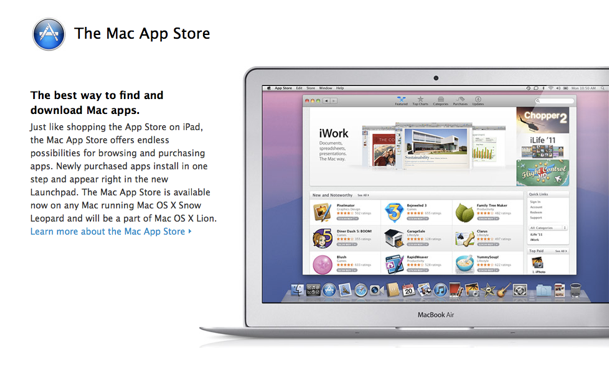
          Im not really sure why this is the first thing mentioned on Apple’s list for improvements in OSX Lion, but we can discuss it anyway. I am curios as to how many people will actually use the App store on their computer. My guess is that Apple wants to make everything very familiar to customers who have an iPhone and are looking to buy a Mac computer. What better way to sell apps than to make the process exactly the same as what is done on the iPhone. I did find one thing that is very interesting. According to www.appshopper.com and their top 200 list, app sales for the iPhone and OSX are significantly different. 12 of the top 15 apps for the iPhone iOS are games ( e.g. Angry Birds, Words With Friends, etc.) while there are only 2 games in the OSX top 15, Angry Birds and Plants vs. Zombies. The target market for the OSX Mac App Store is clearly not the same. The top OSX apps seem to be mostly Apple iLife applications like Pages, iPhoto, Keynote, etc. Also, these OSX apps are much more expensive. 7 of the top 10 are $14.99 or more, including Aperture which is $79.99. Also, it’s looking like many small software companies that already have software available online, are joining the Mac App Store to help sell there stuff. Popular programs like Pixelmator, Things, Rapid Weaver, etc. which have always been available from the company website are now found in the Mac App Store.

          If you are a lover of Apps for the iPhone, iPad, or OSX, i would suggest visiting the AppShopper website mentioned above. They have all sorts of interesting information about apps that are available, including a Blog and a What’s New page. Also, I am interested in hearing about your thoughts on the OSX App store. Have you purchased something from it? what are your thoughts about it?


          Update: 5.26.11
          Just read this article online - about The Mac App Store and Games
          http://news.cnet.com/8301-13579_3-20044432-37.html

          Thursday, March 24, 2011

          OSX Lion Preview - New and Improved

          New_and_Improved-2011-03-24-16-32.jpg

          With the release of OSX Lion speculated for sometime in the next few months, my curiosity has been raising about the new features.
          Many products claim to be “New and improved” ( including the animal crackers i just finished), but none have been able to deliver like the latest products from Apple. Both young and old are familiar with the new iPad, the iPhone, and the already iconic iPod. But Before any of these were ever even thought of, Apple was making a great operating system for the Mac line of computers called OSX. Beginning with 10.0 “Cheetah” in 2001, and 10.1 “Puma” later that year, Apple had a truly created a “new and improved” computer experience. Since then, they have upgraded to a new cat every one or two years bringing us to the king of all operating systems, OSX Lion.

          Over the next several weeks i am planning on breaking down the new features that have already been announced (see them here: http://www.apple.com/macosx/lion/), and giving you an unbiased preview of OSX Lion. I am curious to see what the excitement level is for this new OS as there are more Mac users than ever before. I hope you will enjoy these posts as well as contribute your thoughts on the new features.


          Victor Design Blog

          Random thoughts on Advertising and Design.

          Vic's Posts

          Followers

          HomeRO1
          AboutRO1
          PortRO1
          ContactRO1
          BlogRO1