Showing posts with label Mac. Show all posts

Thursday, October 4, 2012

DropBox - Sending Stuff Safe and Easy

esuslogo101409-2012-10-4-13-55.jpg


I have had several pals asking me about using Dropbox lately, so I thought I would do a quick Blog post on my workflow for sending files on a Mac. At the end I will give some more info on why Dropbox is so very awesome, and why you need to sign up for a free account (Here) if you haven’t already. (Let me know if you would like to set up an account - if you refer a new user with Dropbox, both parties get an extra 500MB of storage.) Also, I have some cool Dropbox quick facts that may surprise you.


OK, So lets get started. Assuming you already have a Dropbox account setup, I am going to share with you the best way to send stuff quickly and safely over the inter-web. Most people just create a New Folder on their Dropbox account and then share that folder with other people via email invitation. While this is great for collaborative projects with several parties, it is not the best option if you just want to send some files.


For this example - Let’s say I took a bunch of Pics at a family get together, and I want to get everyone hi-res versions of them.


epicboxhi-res-2012-10-4-13-55.jpg


Why “Sharing Folders” is a Bad Habit


First of all, (this Is probably just a personal issue) I am a minimalist. Or at least I pretend to be, haha! Anyway, if you use Dropbox a lot, and you create and share a new folder for everything, you will quickly clutter up your Dropbox account. For example, If I took pics at several different family events I would find myself “Sharing” several different Dropbox folders, or with one big unorganized “Family” folder. Eventually, I would have a large mess on my hands. Also, I don’t want pictures from 5 years ago using up my free storage space on Dropbox.


Second, and more importantly, is Safety. Lets say you are sharing a folder with someone, and they get the files they need. Did you know that they will have access to that folder until you delete it? You may have worked on the project several months ago, forgotten about the folder, and then use it for something else. Everyone that was ever sharing that folder has continued access to that folder. Or let’s say you have several different shared folders, and in a hurry - or accidentally - you drop a very sensitive file into the wrong folder. Again, everyone will have access to that in your shared folder. With the Family get together example, Let’s just say Uncle Carl and Aunt Kate aren’t married any more. You don’t want to be sending him pics of “Uncle Jeff and Aunt Kate”. hahah!


Third, some files are just a pain. For example Video files. I have come to find that these are a real pain to send via Dropbox shared folders. The main thing is that Dropbox tries to play the video through your browser. If your Granny doesn’t have a really good internet connection, playback will be choppy and slow. And then she will complain to you about how her computer doesn’t work. Am I right or what?!


beforeafter3-2012-10-4-13-55.PNG


A Better (and Easier) Alternative - the Public Folder


(NOTE: If you do not see a “Public Folder”, you may have accidentally deleted it. No prob! just create a new folder and name it “Public”.)


Send compressed .ZIP files to your relatives, or anyone, following these steps. They don’t even need to have a Dropbox account.


Step 1:


Create a new folder on your desktop and name it “GrannysHouse_10.4.2012”


Step 2:


Put all the files inside that you want to share with people. Pictures, Videos, Documents, etc., etc.


Step 3:


Compress your folder into a .ZIP file (just right click and choose “Compress”)


Step 4:


Put the newly created .ZIP file into your Dropbox “Public” folder


DropBoxZipFiles-2012-10-4-13-55.jpg


Step 5:


You will see the blue spinning arrows, as the .ZIP file is uploading. When it turns into a green check you are ready to send a link.


Just right click on the .Zip file and choose “Copy Public Link”. Now you can go to your email and hit paste in the memo area. You will see a URL link to that Zip file.


DropBox_CopyPublicLink-2012-10-4-13-55.png


Now you can send that email to anyone you want and they just need to click the link to download the Zip file. When they do download it, all they have to do is double click to uncompress the zip file back into a normal folder, full of all the goodies you wanted them to have.


Also, on your end, organization of your Public folder is quick and easy if you name your .zip files descriptively and delete files that are old.


DropBox_King-2012-10-4-13-55.jpg

Is DropBox King of the Cloud?


This is just one scenario, but I have found this process is great pretty much anytime I need to send large files quickly and easily. I worked in the Printing industry for years and have had to deal with the frustration of trying to send and receive large files. Logging onto FTP sites, passwords, file size limitations, etc, etc, all made the process a major headache. The need for Apps like DropBox is great and will only continue to grow. That being said, since I have been using DropBox other file storage and sharing Apps have been popping up like weeds. Some of them are startups like DropBox, but others are from companies you may have already heard of Google, Apple, or Microsoft. hahah! So yeah, the need for sending files through clouds is an ever changing market that has really just begun. I have very limited use with the others, so I can’t really make any suggestions about these apps. If you do a quick Google search like “DropBox alternatives”, you will find an abundance of comparisons between the major Apps. Some of the more popular ones are Google Drive, Microsoft SkyDrive, Apple iCloud, Sugar Sync. Each offer similar services, but you may find one that fits your exact needs.


While I may change my mind in the future, the simplicity of Dropbox makes it an easy choice. The scenario I mentioned above cannot get any simpler, and it’s easy for computer beginners, like “Granny”, to just get the stuff they want.


Quick DropBox facts:


  • Dropbox has more than 50 million users.
  • People save one billion files to Dropbox every 48 hours.
  • Dropbox is installed on 250 million different devices.
  • Dropbox is offered in five languages: English, Spanish, French, German, and Japanese.
  • Dropbox has paying customers in 175 countries.
  • More than half of Dropbox users are from outside the U.S.
  • People in over two million businesses are using Dropbox.

Links and References:


-Also, just a side note. I was looking for a “king” image to put in the blog. Instead of using clip art, I found a logo that I made for my friend Jason King. If you need a cool logo, please, let me know. Working together we can reduce the worldwide use of bad clip art one project at a time. hahaha -


-tks -vh

Thursday, March 15, 2012

The Best iPad Survey Ever!

One of the sites that I often check, Dealnews.com, had an article about tablets that was very interesting. They did a poll on those who were thinking of buying a new tablet, and had a lot of questions about the “new” iPad. What’s cool is they used a little creative design to make this way more visual than your typical survey. Way to go guys, this is what I call a survey!


DealnewsSurvey-2012-03-15-20-10.png


Link to full article here:


http://dealmac.com/features/Survey-Says-iPad-2-is-the-Second-Most-Popular-Tablet-for-First-Time-Buyers/558264.html

Thursday, February 16, 2012

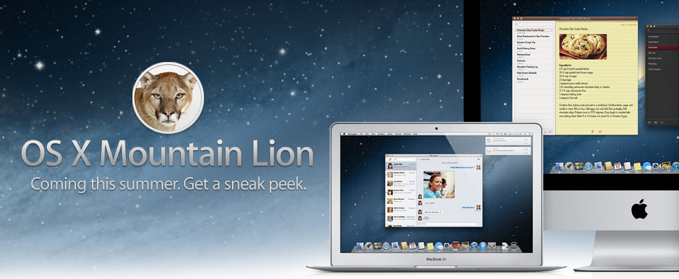
OSX Mountain Lion - Coming Summer 2012

OSXMountainLion-2012-02-16-13-15.png


Lion is no longer king of the OS jungle. Believe it or not Apple has just announced another OSX update - Mountain Lion “coming this summer”. I feel like a broken record on the OSX previews. Once again the “upgrades” are centered around iPhone and iPad users. Lion adopted gestures, apps, and many other things from iOS, and Mountain Lion is doing the same thing.


It seems like most of new features mentioned have to do with actually connecting to iPhone and iPad users. With Mountain Lion, Mac computer users can connect with iOS users and send messages, reminders, notifications, etc. Also, Mac computers can now hook up with iOS gamers via the Game Center. As a non-iPhone user, I guess I can finally stop playing “Words Without Friends” and get in on the real thing. hahah. OSX Mountain Lion will feature AirPlay Mirroring like the iPad and iPhone, so you can zap that YouTube video or PowerPoint presentation from your computer to your TV.


Having just started working with OSX Lion this week, this news is really not that exciting for me. Maybe its because I’m bitter. Just yesterday I sent Apple a feedback email about skrewing up my Exposé/Hot Corner workflow I had used for years. (actually dating back to OS9 with the Window Monkey plugin) Anyways, we shall see what happens. With a new iPad coming out next month, this will only add to the 2012 Apple hype.


If you would like some more info, here is a link to the Apple Mountain Lion page:


http://www.apple.com/macosx/mountain-lion/


for those that are attention deficit, illiterate, or just plain lazy here is a Video preview:


http://www.apple.com/macosx/mountain-lion/features.html#video-mountainlion


Update:
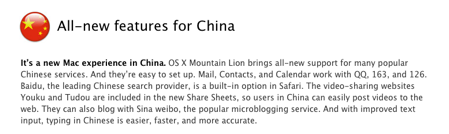
Just saw this on the Mountain Lion Features page. hahah! Title should read, “China: our new target demo”


OSX_China-2012-02-16-13-15.png

Thursday, July 21, 2011

OSX Lion uncaged!

OSX_Lion_LEDdisplay-2011-07-21-08-59.jpg

OK, so it looks like i was not able to preview all of the new updates for Lion before it came out. This could be because I procrastinated, the advertised “new features” were becoming less and less exciting to me, or a mixture of the two. haha! That being said, the time of observing the Lion while it is caged is over. The Lion has finally been set free for all (most) Mac users to use. If you are unsure about whether to upgrade or not, here is a checklist of things to consider:

1. ”Lion runs on all Macs with a 64-bit Intel processor — this eliminates the very first MacBook and MacBook Pro machines Apple sold, the very first Intel based iMac, and the first- and second-generation Intel-based Mac minis.”**** - (This was news to me)

2. You must have OSX 7 Snow Leopard to install OSX Lion
      • also, if you have done a recent software update you probably already have the “App Store” on your system.  It will be necessary to have this in order to purchase the OSX download 
    3. OSX Lion is about a 4GB download from the App Store, so make sure you have a good internet connection or you start the download just before you go on vacation!
        4. OSX Lion is a $29.99 purchase from the App Store
            • - NOTE!!! - This means you can use your iTunes gift cards to purchase OSX Lion! So you can finally cash in all of those unused Apple gift cards you got for Christmas. Also, for the deal nerds like myself, you can save a few dollars on the purchase price. How? Just google “iTunes gift card sale” and you can probably find a local drugstore, supermarket, or electronics store that is offering a deal on the cards. These places offer the gift cards at a discount just to get you in the door. I usually check www.dealmac.com for a Mac deals. If you can’t seem to find anything, there is always eBay. This will probably only save you a few dollars, but hey, you can make fun of your friends for paying FULL Price! Boooooooo!

          If you want some more info, i would suggest reading the link below for a Lion Review by Edward Baig of USA Today. It is rather lengthy, but who am I to bash someone for rambling in an article. After all the news I’ve read, I think best new feature would have to be the “auto-save” that Lion performs in the backround. According to Baig’s article, not all Applications support this feature right now, but it is probably in the near future. While this feature seems very very helpful, I still think I will wait to purchase the update. Personally, I usually wait a few weeks when these updates come out so they can work out all the kinks. This will be less of an issue now than those what had to jump from Tiger to Leopard, but kinks still do exist. In fact, Baig mentioned having some issues with his Wi-Fi with OSX Lion.

          **** http://www.usatoday.com/tech/columnist/edwardbaig/2011-07-20-apple-lion-reviewed_n.htm - “Apple launches Lion, and it roars” - by Edward Baig of USA Today

          Everything considered, it’s just another phase of Apple staying ahead of the game. What will you do? Will you make the leap to Lion?

          Friday, July 1, 2011

          3) Multi Touch Gestures

          MultiTouchGestures1-2011-07-1-15-12.png

          Gestures are nothing new to Apple fans, but this is the first OSX update that is promoting use on the computer. Rubber-band scrolling, page and image zoom, and full-screen swiping are all routine for those who have an iPhone or iPad. Some of the gestures have been available to those who purchased the Magic Mouse or the Magic Trackpad for use with their Mac. But with the OSX Lion update, laptop trackpads will now be gesture happy like the other Apple devices.


          MultiTouchGestures-2011-07-1-15-12.png

          If you are not familiar with the different gestures, Apple now has a pictorial on their website (http://www.apple.com/macosx/whats-new/gestures.html) as well as a quick 2 minute video tutorial to show you the gestures in action on a laptop (see top right of gestures page).

          Once again, this is Apple being intuitive and making something that we would never have asked for. We would have carried on for the rest of our lives using the mouse to click and scroll! Again, I must say that Apple is promoting this feature and OSX Lion like it’s some kind of life changing update. Most of these updates, we would expect to be on the next OSX release. Well, even though I jest at the advertising, I will still enjoy the simple time saving gestures just like everyone else.

          Monday, June 6, 2011

          Apple OSX Lion released in July

          OSXLion6.2011Pic-2011-06-6-21-49.png

          Steve Jobs announced today at its Worldwide Developer Conference, that OSX Lion will be released in July. (This is actually earlier than i was expecting, i guess i will have to hotfoot my New Feature reviews haha!) The new Macintosh computer upgrade will cost $29.99. Also, if you check out Apple’s new OSX Lion page, (http://www.apple.com/macosx/whats-new/#video-lion) they have just added some more info and pictures about the new OSX features. There is even another one of those cool Apple videos where you can get a visual of some of Lion’s features in action. There is a tutorial video of how Multi-Touch Gestures will be used as well.

          If you click the link below, you can read a USA today article that sums up the events at the Worldwide Developer Conference today. The major news was mainly concerning the new iCloud services; however, there is also some mention of OSX Lion and the new iOS. A lot of new information on all three of these subjects is easily available on the updated Apple homepage (www.apple.com)

          http://www.usatoday.com/tech/news/2011-06-06-apple-icloud_n.htm

          It looks like the battle between all the big electronics and technology players is really beginning to heat up. It will be interesting to see what goes on this summer; Apple just showed a few of their cards today.

          Wednesday, May 25, 2011

          2) Launchpad

          Screenshot2011-04-01at6.05.31PM-2011-05-25-00-49.png


          Next on the list of new things for OSX Lion is LAUNCHPAD!!!
          Personally, this feature seems to be very dull, so I added the exclamation points to keep you interested. haha!
          This is really just another feature taken from the iPad and iPhone operating systems. It allows for quick and easy access to your computers applications including groups and folders. One cool thing is that It does take advantage of the new gestures that will be available in OSX Lion. While Launchpad sounds cool, and will be familiar for those with iPhones and iPads, I’m curious why Apple thinks it’s such a big deal. It’s not really a new idea because you can accomplish the same thing in Snow Leopard. I have a similar setup on my Dock that allows me quick access to my Applications folder. If your curious, here is a quick video of how I access my Apps.


          Saturday, March 26, 2011

          1) The Mac App Store

          Screenshot-TheMacAppStore-2011-03-26-18-41.pngOSX Lion - The Mac App Store


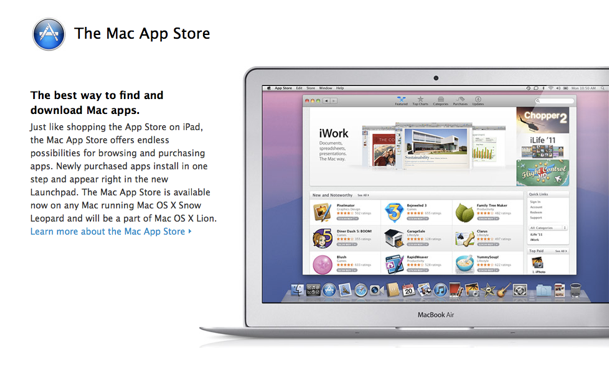
          Im not really sure why this is the first thing mentioned on Apple’s list for improvements in OSX Lion, but we can discuss it anyway. I am curios as to how many people will actually use the App store on their computer. My guess is that Apple wants to make everything very familiar to customers who have an iPhone and are looking to buy a Mac computer. What better way to sell apps than to make the process exactly the same as what is done on the iPhone. I did find one thing that is very interesting. According to www.appshopper.com and their top 200 list, app sales for the iPhone and OSX are significantly different. 12 of the top 15 apps for the iPhone iOS are games ( e.g. Angry Birds, Words With Friends, etc.) while there are only 2 games in the OSX top 15, Angry Birds and Plants vs. Zombies. The target market for the OSX Mac App Store is clearly not the same. The top OSX apps seem to be mostly Apple iLife applications like Pages, iPhoto, Keynote, etc. Also, these OSX apps are much more expensive. 7 of the top 10 are $14.99 or more, including Aperture which is $79.99. Also, it’s looking like many small software companies that already have software available online, are joining the Mac App Store to help sell there stuff. Popular programs like Pixelmator, Things, Rapid Weaver, etc. which have always been available from the company website are now found in the Mac App Store.

          If you are a lover of Apps for the iPhone, iPad, or OSX, i would suggest visiting the AppShopper website mentioned above. They have all sorts of interesting information about apps that are available, including a Blog and a What’s New page. Also, I am interested in hearing about your thoughts on the OSX App store. Have you purchased something from it? what are your thoughts about it?


          Update: 5.26.11
          Just read this article online - about The Mac App Store and Games
          http://news.cnet.com/8301-13579_3-20044432-37.html

          Thursday, March 24, 2011

          OSX Lion Preview - New and Improved

          New_and_Improved-2011-03-24-16-32.jpg

          With the release of OSX Lion speculated for sometime in the next few months, my curiosity has been raising about the new features.
          Many products claim to be “New and improved” ( including the animal crackers i just finished), but none have been able to deliver like the latest products from Apple. Both young and old are familiar with the new iPad, the iPhone, and the already iconic iPod. But Before any of these were ever even thought of, Apple was making a great operating system for the Mac line of computers called OSX. Beginning with 10.0 “Cheetah” in 2001, and 10.1 “Puma” later that year, Apple had a truly created a “new and improved” computer experience. Since then, they have upgraded to a new cat every one or two years bringing us to the king of all operating systems, OSX Lion.

          Over the next several weeks i am planning on breaking down the new features that have already been announced (see them here: http://www.apple.com/macosx/lion/), and giving you an unbiased preview of OSX Lion. I am curious to see what the excitement level is for this new OS as there are more Mac users than ever before. I hope you will enjoy these posts as well as contribute your thoughts on the new features.


          Victor Design Blog

          Random thoughts on Advertising and Design.

          Vic's Posts

          Followers

          HomeRO1
          AboutRO1
          PortRO1
          ContactRO1
          BlogRO1